GAGE TRACKING SOFTWARE
CalibraCore is gage tracking software that keeps one live register of every gage you own — where it is, who took it, and when it is next due for calibration. A gage is only useful if you can find it and trust it. This tracks both.
- Know where every gage is
- Know who has it
- Know when it is due
- No credit card
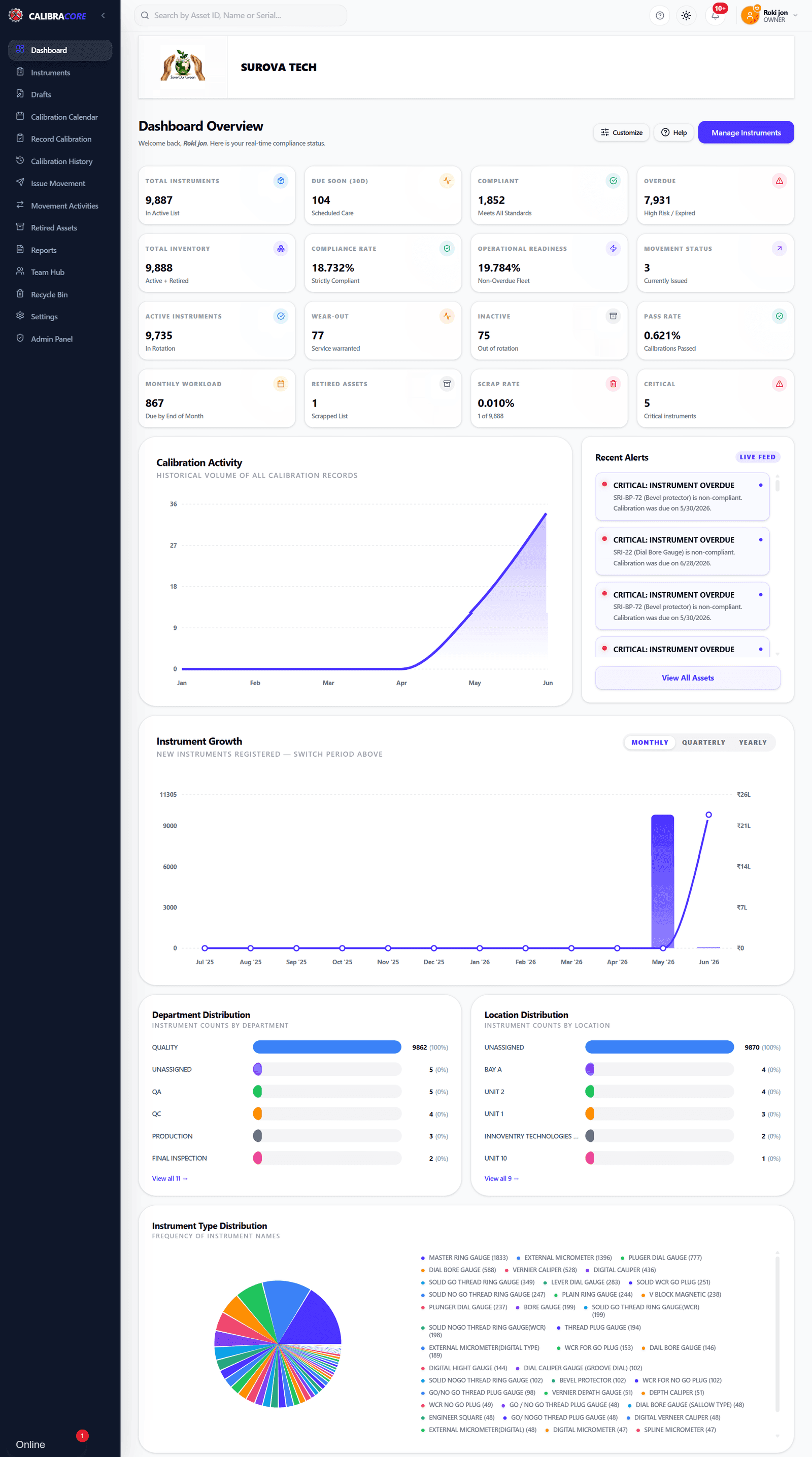
One register for the whole gage inventory — included on the free plan
What is gage tracking software?
Gage tracking software keeps a live register of every gage you own. It records what each gage is, where it lives, who is holding it now, and when it is next due for calibration. It replaces the shared spreadsheet and the sign-out sheet on the crib wall with one record everybody reads from.
You will see the same tool sold as gage management software, gauge tracking software or gage crib software. The names change; the job does not. If you only need the calibration half — due dates, results and certificates — start with free gage calibration tracking instead.
In short: gage tracking software answers three questions at once — which gage, where is it, and can I trust it today?
Why do shops lose track of their gages?
Gages go out and never come back
A gage is signed out for one job, ends up in a toolbox, and nobody notices until it is due for calibration. The sign-out sheet only works while somebody keeps writing on it.
Nobody owns the spreadsheet
A shared file is right on the day it is edited. Two shifts later it is guesswork. The gage that goes missing is rarely the one on the row somebody remembered to update.
Location lives in people's heads
The person who knows where the thread gauges are kept is on leave. A register that stores location and department turns that knowledge into something the shop can read.
In short: gages are lost in the gap between the crib and the job — so tracking has to follow custody, not just the calibration date.
What does the gage register actually hold?
One record per gage. Each field exists to answer a question somebody on the floor or in an audit will ask.
| Field | Question it answers |
|---|---|
| Gage ID & serial number | Which exact gage is this? |
| Name, range and least count | What can it measure, and how finely? |
| Location & department | Where does this gage live? |
| Movement status | Is it in store, or issued to someone? |
| Lifecycle status | Active, wearing out, inactive or scrapped? |
| Last calibrated & next due | Is it safe to use today? |
| Certificate number & attachments | Where is the proof? |
| Critical flag | Does a failure here affect the product? |
In short: the register is the gage's identity, its address and its health record in one place.
How does gage issue and return work?
Every gage carries a movement status: In Store or Issued. When somebody takes a gage you mark it issued and record the department it went to. When it comes back you mark it in store. Two states, kept honest, are enough to end most "who has it?" conversations.
The issued and in-store lists are separate views, so a supervisor can see everything currently out on the floor in one screen, and a quality lead can see what is available to pull for calibration without disturbing a job.
In short: custody is a field on the gage, not a memory or a clipboard.
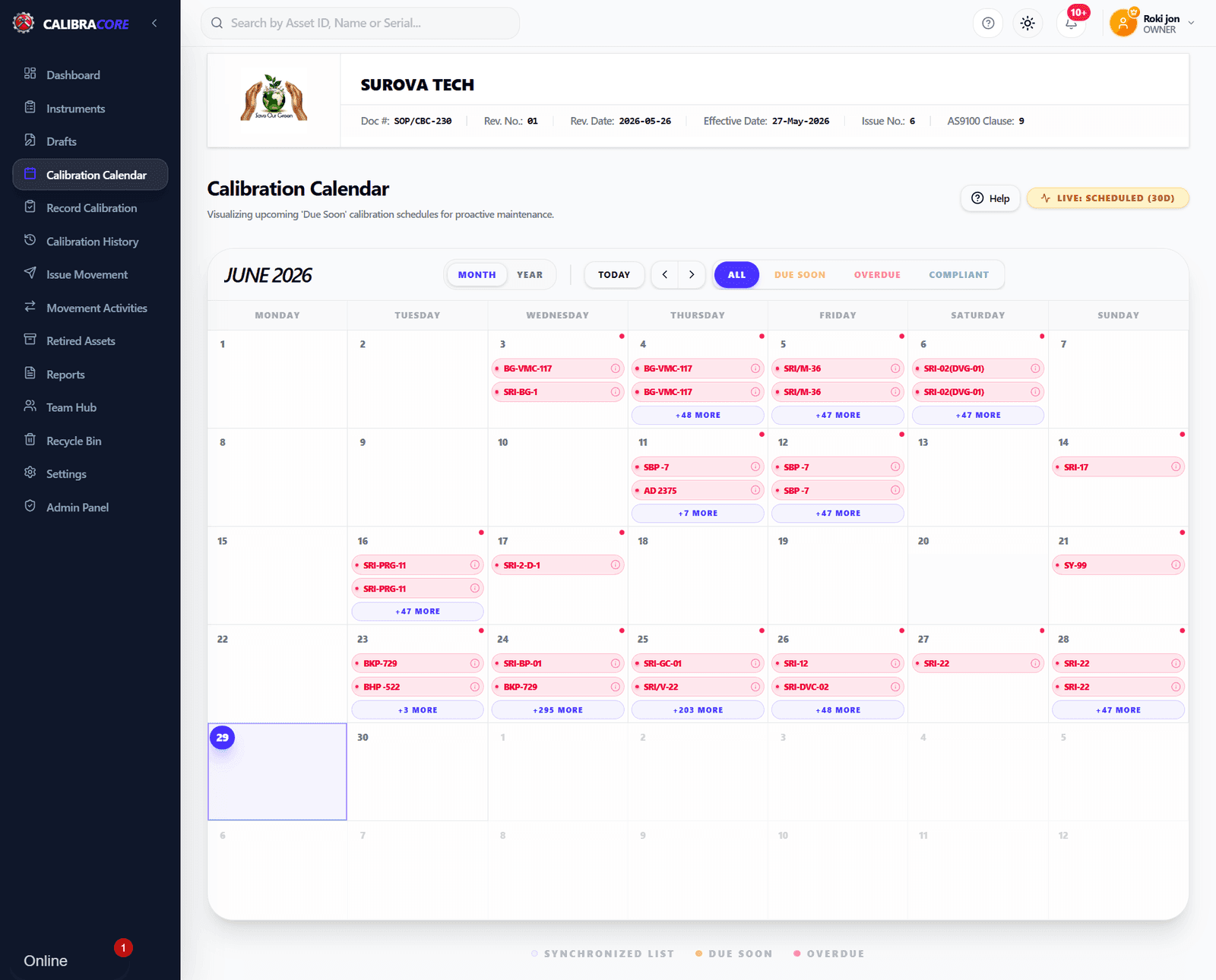
Due dates on one calendar
Tracking where a gage is only helps if you also know whether it can be trusted. Each gage gets its own calibration interval, and the calendar colours what is due soon and what is overdue — so an issued gage that has gone past its date is visible before it measures another part.
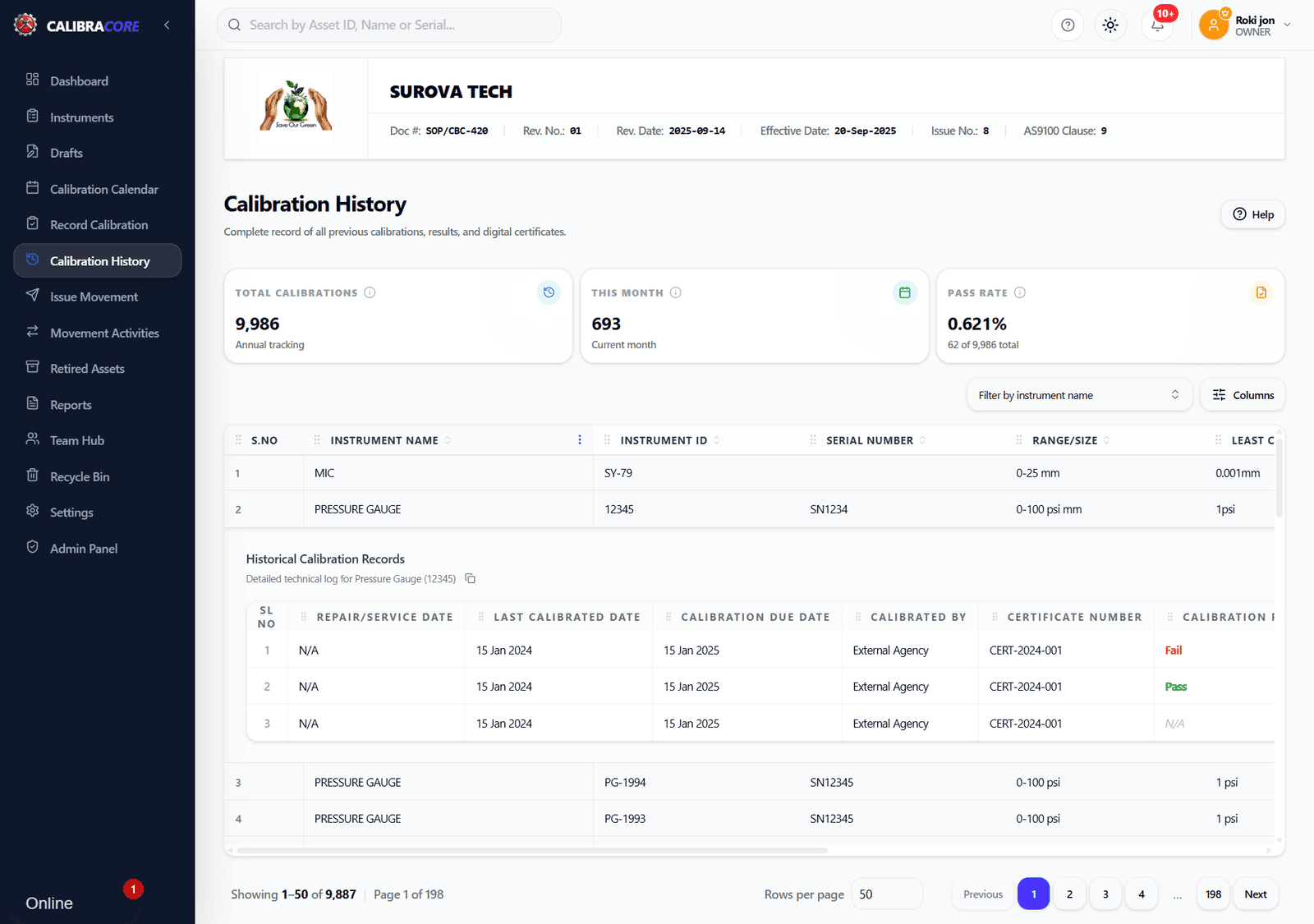
History that stays with the gage
Every calibration is stored against the gage with its date, result and certificate number, and certificates can be attached as files. When a gage fails a check, that history is what tells you how far back to look.
See the register in use
A walkthrough of the register, calendar and calibration history.
What should gage tracking software be able to do?
Use this as a checklist against any tool you look at, including ours. The last three rows are things CalibraCore does not do — they are on the list because rival tools have them and you should know before you sign up, not after.
| Capability | Why it matters | CalibraCore |
|---|---|---|
| Gage register with unique IDs | One record per gage, so two micrometers are never confused. | Gage ID, serial number and an alternate ID for a second coding system |
| Location & department | Tells you where to look before anyone walks the floor. | Both, and the register filters on either |
| Issue & return (custody) | Gages go missing between the crib and the line, not in the crib. | In Store / Issued status per gage, with an issued and in-store view |
| Calibration due dates & alerts | An overdue gage in use is a quality problem, not a paperwork one. | Per-gage interval, calendar view, email and desktop alerts |
| Calibration history & certificates | The proof an auditor asks for, per gage, for its whole life. | Full history with certificate numbers and PDF/JPG/PNG attachments |
| Lifecycle status | A worn gage should stop being used before it fails a check. | Active, Wear-Out, Inactive and Scrap, with history kept after scrapping |
| Bulk import from Excel or CSV | Nobody retypes 400 gages, so a hard import means the tool never gets used. | Import the whole list in one upload, on every plan |
| Reports & export | Auditors and managers want the list in their own hands. | Excel export of the register and of calibration history |
| Role-based access | Everyone should read the register; not everyone should edit records. | Roles decide who can view, add and edit |
| Barcode / QR scanning | Scanning a label is the fastest way to check a gage in and out. | Not built in — you search by ID, name, serial or range instead |
| Gage R&R / MSA studies | Some quality plans require measurement systems analysis in the same tool. | Not built in — see the GAGEtrak comparison if you need it |
| RFID / GPS asset tracking | Live positioning for gages spread across a large site. | Not built in — custody is recorded by people, not sensors |
In short: nine of these twelve are core tracking and every serious tool should have them. The last three are where products genuinely differ — decide if you need them before you shortlist.
What comes with the free plan
Full gage tracking for 20 gages and 1 team member — the same features as the paid plans, with a smaller limit.
- 20 Instruments
- 1 Team Member
- Import instruments in bulk via Excel or CSV file
- Calibration Plan Calendar
- Calibration History Record
- Store's Instrument Movement Activities
- Central Instrument Registry
- Dual Email & Desktop Alerts
- Multi-Sheet Excel Reports
- QMS Header Customization
- Retired Assets Management
- Advanced Analytics Dashboard
- Instrument Price & Asset Value Tracking
What does gage tracking software cost?
Most gage tracking tools in this market are quoted, not priced — you fill in a form and wait for a number. CalibraCore publishes its plans. The free plan is $0 a month for 20 gages and 1 team member, forever, with no card. Paid plans start at $10 a month and go up to 10,000 gages.
Two costs are easy to miss when you compare. The first is installation: a desktop tool needs a machine, a database and somebody in IT to own it. The second is the time to load your gages — if a tool cannot import a spreadsheet, that is days of typing before anyone gets value. We publish a sourced price comparison across vendors so you can check the published numbers yourself.
In short: compare the licence, the install and the data-loading effort — not just the sticker price.
How do you choose gage tracking software?
Count your gages, then double it
Pick a plan for the inventory you will have in two years, not the one in the drawer today. Moving between plans is easy; moving between products is not.
Check the import path first
Ask to import your real gage list during the trial. A tool that cannot take your spreadsheet will quietly never be adopted, however good the demo looked.
Decide if you need scanning
If gages move dozens of times a day, barcode checkout saves real time and you should buy a tool that has it. If they move a few times a week, a searchable register is enough.
Decide if you need MSA in the same tool
Gage R&R and MSA are separate work from tracking. Some teams need them in one system; many run them elsewhere. Be honest about which you are before you shortlist.
Check who else has to use it
If machinists need to look a gage up, a browser tool with roles beats an installed one behind an IT ticket. Count the people, not just the licences.
In short: size for two years out, test the import with your real list, and settle the scanning and MSA questions before you compare prices.
When another tool is the better fit
If you need built-in gage R&R and MSA, or barcode-driven crib checkout, CalibraCore is not the right pick — and we would rather say so here than after you have loaded 400 gages. Our GAGEtrak comparison and GageList comparison lay out those trade-offs with sourced, dated facts, and every head-to-head we publish is listed in one place.
Does gage tracking help with ISO 9001 and IATF 16949?
Yes — and the part auditors press on is identification and status. ISO 9001 clause 7.1.5.2 asks that measuring equipment be identified and that its calibration status be clear. A register with a unique ID per gage, a current location and a live due date is exactly that evidence. IATF 16949 goes further and expects you to show records for each gage, including what happens when one is found out of tolerance.
The practical test is simple: an auditor points at a gage on the bench and asks when it was last calibrated and who owns it. If the answer takes one search, you are ready. The full standards-by- standard breakdown lives on the gage calibration tracking page.
In short: identification, location and status per gage is what turns an audit question into a one-minute lookup.
How do you start in 4 steps?
- 1
Import your gage list
Upload your existing Excel or CSV list. IDs, serial numbers, locations and due dates come across in one go.
- 2
Set location and owner
Give each gage its department and location, so the register knows where it lives when nobody has it.
- 3
Issue and return gages
Mark a gage "Issued" when someone takes it and "In Store" when it comes back. Custody stays visible.
- 4
Watch due dates
Set each gage's calibration interval. Alerts land before the due date, so nothing goes overdue in use.
Where to go next
Free gage calibration tracking
The calibration half in depth — intervals, certificates and the standards behind them.
Free calibration management software
The same system across every instrument, not only gages. Free forever, no card.
Best calibration software by country
Local guides with accreditation bodies, currency and the vendors that operate there.
Frequently asked questions
What is gage tracking software?
Gage tracking software keeps a live register of every gage you own — its ID, where it is, who is holding it and when it is next due for calibration. It replaces the shared spreadsheet and the sign-out sheet on the tool crib wall with one record everybody reads from.
What is the difference between gage tracking and gage calibration software?
Gage tracking covers the whole life of the gage: where it sits, who took it, and what state it is in. Calibration software covers one part of that — due dates and results. Most teams need both, which is why CalibraCore keeps custody, location and calibration in the same record.
How do I find out who has a gage right now?
Each gage carries a movement status of "In Store" or "Issued". When a gage is issued you record who took it and which department it went to, so the register answers "who has the 0–25 mm micrometer?" without anyone walking the floor to ask.
Can I track gages across departments and locations?
Yes. Every gage has a location field and a department field, and you can filter the register by either. A shop that shares gages between two lines, or a company with gages at three sites, can see each site's list on its own and the whole inventory together.
Does CalibraCore support barcode or QR scanning?
No. There is no barcode or QR scanning today, and no RFID or GPS tracking. You find a gage by searching its ID, name, serial number or range, which is fast but not the same as scanning a label. If scan-based checkout is a must-have, say so when you compare tools.
Does it do gage R&R or MSA studies?
No. CalibraCore tracks gages, schedules and history — it does not run gage repeatability and reproducibility or Measurement Systems Analysis studies. If your quality plan needs built-in MSA, a heavier tool is the better fit; the GAGEtrak comparison page sets out that trade-off.
How do I move my existing gage list into it?
Import it. You upload your gage list from an Excel or CSV file and the whole register lands in one go, including IDs, serial numbers, locations and due dates. Most teams start from the spreadsheet they already keep, so nothing is retyped and nothing is lost.
What happens to a gage that is scrapped or taken out of use?
You mark its lifecycle status — Active, Wear-Out, Inactive or Scrap. A scrapped gage moves out of the working register but keeps its full history, so an auditor can still see what it measured and when it was last calibrated. Nothing is deleted to tidy up a list.
How many gages can I track for $0?
The free plan holds up to 20 gages with 1 team member, for $0 a month, forever. There is no trial clock and no card needed. Paid plans raise the limit to 10,000 gages and add more users, with the same tracking, movement and history features throughout.
Is gage tracking software worth it for a small shop?
It is worth it as soon as gages start leaving the crib. With a dozen gages in one drawer a spreadsheet copes. Once gages move between people, shifts or sites, the spreadsheet is out of date the moment someone forgets to edit it — and that is the gage that turns up overdue in an audit.
Can my whole team use the same gage register?
Yes, within your plan's user limit. Everyone sees the same live register, and access is set by role, so a machinist can look up a gage while only the quality team edits calibration records. That is the point of a shared system: one version of the truth, not five copies of a file.
Put every gage on one register
Import your list, set locations, and know where each gage is by the end of the day. Free for up to 20 gages, forever.