FREE CALIBRATION MANAGEMENT SOFTWARE
CalibraCore is free calibration management software for small teams. Track up to 20 instruments, build a calibration schedule, and keep a full calibration history for $0 — forever. No trial clock, no credit card. It is the simple way to move off spreadsheets and stay ready for an ISO audit.
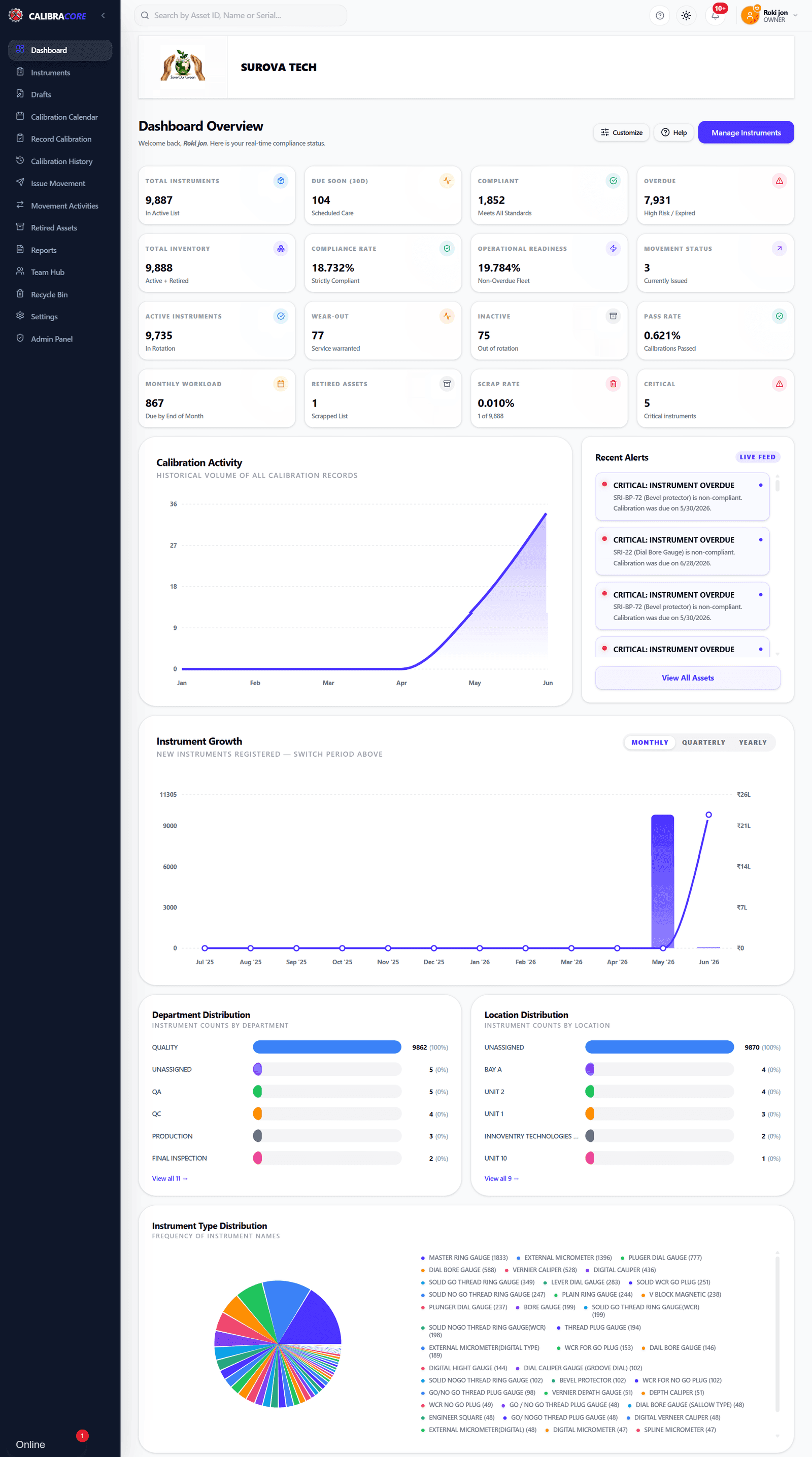
The CalibraCore dashboard — included on the free plan
Watch the demo
See how free calibration management software works in a short walkthrough.
What is free calibration management software?
Free calibration management software is a no-cost tool that tracks your measuring instruments, schedules their calibrations, and stores the calibration history in one place. It replaces spreadsheets and paper. CalibraCore gives you this on a plan that is free forever for up to 20 instruments. You may also see this kind of tool called calibration tracking software or a calibration management system — the name changes, the job stays the same.
A good calibration management system answers three questions at any moment: what instruments do we own, when is each one due, and what is the proof it was calibrated on time. CalibraCore keeps all three up to date for you, so a quality check or an ISO audit is quick instead of stressful.
This is the same control that quality standards ask for — the ISO 9001 and ISO/IEC 17025 rules on measuring equipment expect a schedule and a record for every instrument.
In short: free calibration management software tracks your instruments, their due dates and their calibration history at no cost — the job a spreadsheet cannot do on its own.
What do you get on the free plan?
The Free plan gives you full, free calibration tracking — 20 instruments and 1 team member, with every core feature, not a stripped-down demo.
- 20 Instruments
- 1 Team Member
- Import instruments in bulk via Excel or CSV file
- Calibration Plan Calendar
- Calibration History Record
- Store's Instrument Movement Activities
- Central Instrument Registry
- Dual Email & Desktop Alerts
- Multi-Sheet Excel Reports
- QMS Header Customization
- Retired Assets Management
- Advanced Analytics Dashboard
- Instrument Price & Asset Value Tracking
In short: the free plan is not a limited demo — you get every core calibration feature for up to 20 instruments.
What instruments can you track for free?
Any measuring instrument that needs regular calibration. You add each one, set its interval, and CalibraCore tracks the rest — no matter the type. Tracking gauges specifically? See our free gage calibration tracking software, or gage tracking software if you also need to know where each gage is and who has it.
Dimensional gauges
Ring, plug, snap and thread gauges, calipers, micrometers, height and bore gauges.
Pressure & temperature
Pressure gauges, transmitters, thermometers, thermocouples and temperature baths.
Electrical & electronic
Multimeters, clamp meters, oscilloscopes, insulation testers and power sources.
Weighing & mass
Balances, weighing scales and reference weights used across the shop floor.
Torque & force
Torque wrenches, force gauges and load cells that drift with heavy use.
Any custom instrument
Add any instrument with your own name, ID and calibration frequency.
In short: if it needs calibration, you can track it free — gauges, meters, pressure, temperature, weighing, torque and more.
Who is the free plan for?
Small workshops
A machine shop or fabrication unit with a handful of gauges and meters that still need to be checked on time.
Single-person quality roles
One quality or maintenance person who tracks calibration today in Excel and wants a clear due-date view instead.
Startups going for ISO
A new lab or factory preparing for ISO 9001 or ISO 17025 that needs a clean calibration record from day one.
In short: the free plan fits small workshops, solo quality or maintenance staff, and startups getting ISO-ready.
Is free software enough for ISO 9001 & ISO 17025?
Yes. Every major quality standard asks for the same two things: control your measuring equipment and prove it. The free plan gives you that proof — a schedule and a full history for every instrument.
ISO 9001
Clause 7.1.5 asks you to identify, calibrate and keep records for monitoring and measuring resources. A live register with due dates and history covers exactly that.
ISO/IEC 17025
Calibration labs must show their reference equipment is itself calibrated and traceable. Track intervals, results and certificates for your own instruments in one place.
IATF 16949 (automotive)
Automotive audits check that every gauge has a schedule, a calibration record and a way to recall it if found out of tolerance. The free plan keeps all of it per instrument.
AS9100 (aerospace)
Aerospace traceability means each instrument needs a full calibration history with certificate numbers. That record stays with the instrument for its whole life.
In short: the free plan gives you the due-date control and audit trail that ISO 9001, ISO 17025, IATF 16949 and AS9100 all expect — at no cost.
Why leave spreadsheets for free software?
Many teams track calibration in Excel. It is free, but it does not remind you, it has no audit trail, and one wrong cell can hide an overdue instrument. Here is how a free calibration tool compares. Comparing paid tools too? See our roundup of the best calibration software.
| Capability | Spreadsheet | CalibraCore |
|---|---|---|
| Audit Readiness | ❌ Last-minute panic | ✅ Always audit-ready |
| Real-time Due soon & overdue alerts | ❌ Manual tracking | ✅ Automated alerts |
| Automated Alerts (30/15/7 days + Due soon & overdue) | ❌ No automation | ✅ Email & Desktop alerts |
| Calibration History Tracking | ❌ No tracking | ✅ Always traceable |
| Calibration History Card | ❌ No history view | ✅ Always available history card |
| Calibration Report Save | ❌ No central save | ✅ Cloud storage (secure & accessible) |
| Instrument Movement Activities | ❌ No activity tracking | ✅ Real-time activity records |
| Instant filtering & search | ⚠️ Limited filters | ✅ Advanced smart search |
| Mobile + tablet ready | ❌ Poor usability | ✅ Fully responsive |
| Audit trail (tamper-proof) | ❌ Easily editable | ✅ Secure, logged history |
| Role-based access (RBAC) | ❌ Not secure | ✅ Full access control |
| Live Compliance Dashboard | ❌ Static data | ✅ Real-time metrics |
| Eliminate Human Errors Completely | 🔴 High Risk | 🟢 Zero Manual Errors |
| Multi-User Collaboration | ⚠️ Version Conflicts | ✅ Real-time Sync |
| Scalability | ❌ Breaks at scale | ✅ Handles 1000+ instruments |
| Data Security | ❌ Easily leaked | ✅ Secure & encrypted |
| Time Saved | ❌ Hours wasted | ✅ 70% time saved |
| Setup time | ⚠️ Hours–Days | ✅ Minutes |
| Cost Visibility | ❌ Unpredictable Hidden Costs | ✅ Fixed, Transparent Pricing |
| Instrument Price & Asset Value Tracking | ❌ No cost visibility | ✅ Per-instrument price + total investment |
In short: a free calibration tool adds automatic reminders, a full history and a tamper-proof audit trail — the three things a spreadsheet cannot give you.
Is CalibraCore open source?
Some people search for open source calibration management software to avoid licence fees. That is a fair goal. But open source is not the only way to get a free tool — and it is not always the cheapest in practice.
CalibraCore is not open source. It is a hosted cloud product with a plan that is free forever. With open source software you download the code, but then you have to host it, secure it, update it and back it up yourself. That takes a server and technical time. With CalibraCore's free plan, all of that is done for you, and you still pay nothing.
- No server to set up or pay for
- Security and backups handled for you
- Automatic updates — always the latest version
- Ready to use in minutes, not days
In short: CalibraCore is not open source, but its free plan gives you a hosted, secure, maintained tool with nothing to install — often less work than self-hosting an open-source option.
How to start in 4 steps
- 1
Create your free account
Sign up with your email. No credit card is asked for. Your free workspace is ready right away.
- 2
Add or import your instruments
Add instruments one by one, or import your whole list from an Excel or CSV file in one go.
- 3
Set calibration schedules
Give each instrument its calibration interval. CalibraCore builds the due-date calendar for you.
- 4
Track and record calibrations
Get email and desktop alerts before each due date. Record each calibration to build the history.
What tools does the free plan include?
Calibration plan calendar
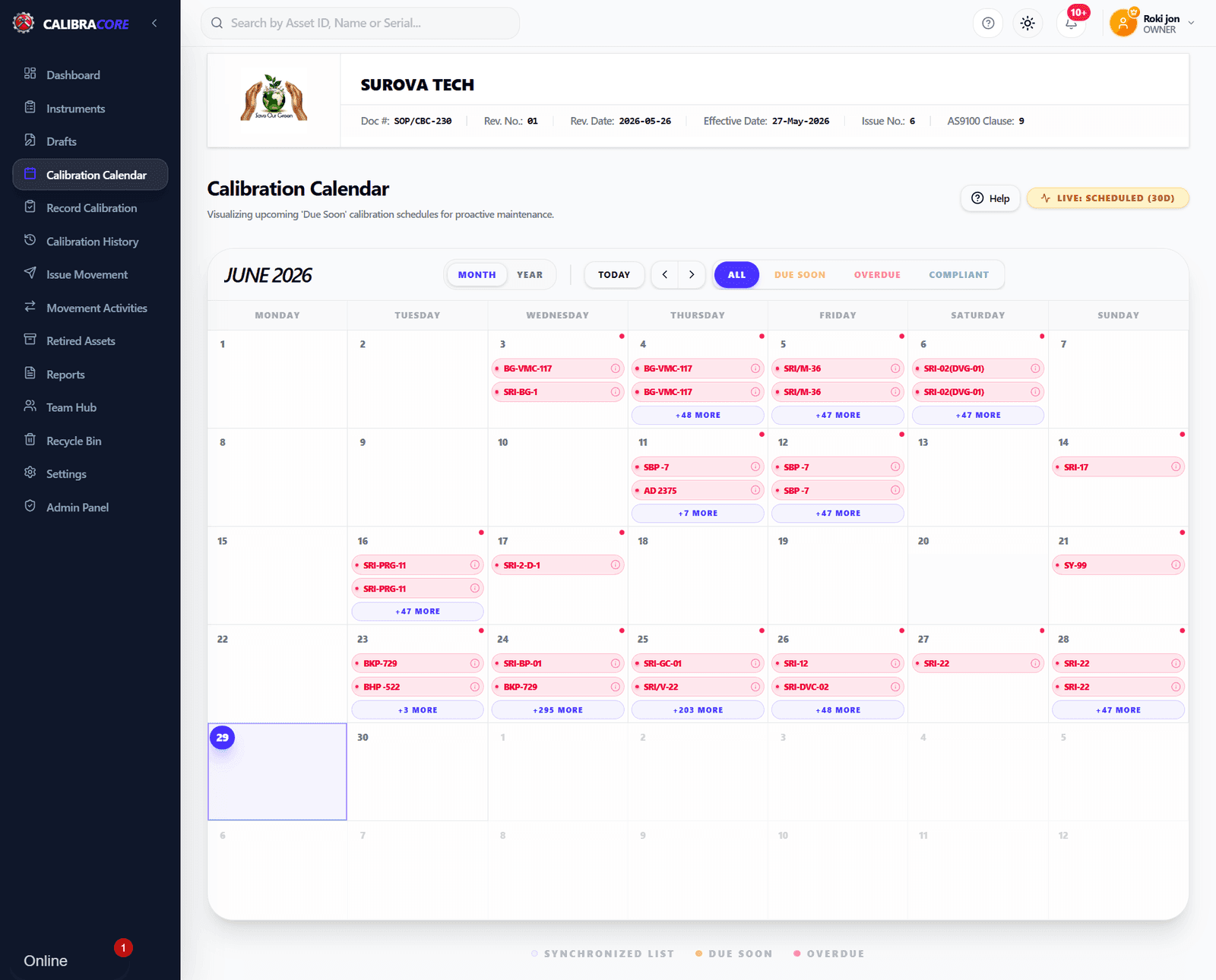
See every instrument due this week, this month and beyond on one calendar. No more scrolling a spreadsheet to find what is overdue. The schedule updates itself as you record each calibration.
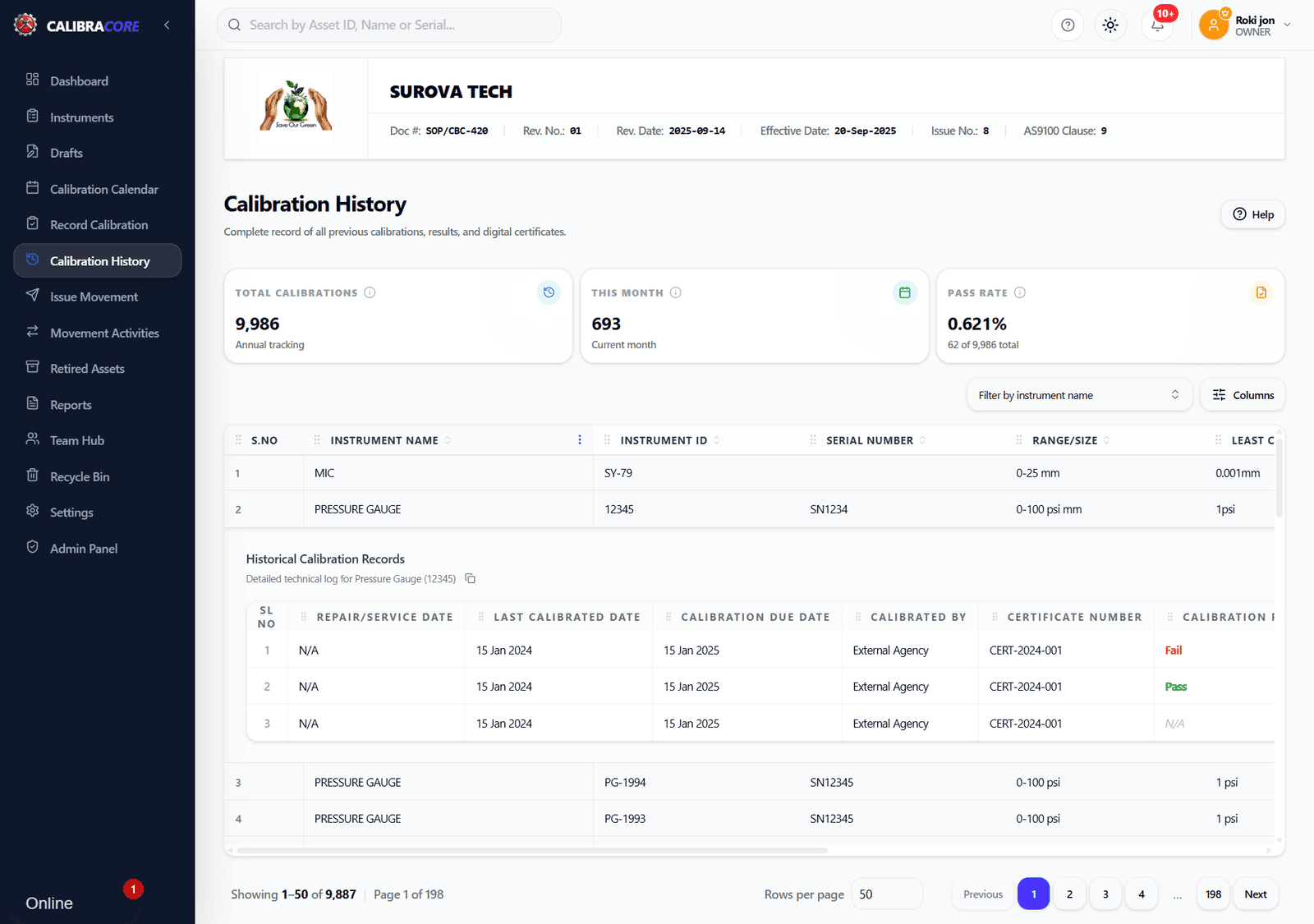
Calibration history record
Every calibration is saved with its date and result. This history is the proof an ISO 9001 or ISO 17025 auditor asks for. It stays with the instrument for its whole life, so nothing is lost.
Bulk import from Excel or CSV
Already track calibration in a spreadsheet? Import your full instrument list in one upload. You keep your existing data and stop the manual typing — even on the free plan.
Email and desktop alerts
CalibraCore warns you before an instrument is due, by email and on screen. You catch due dates early instead of finding an overdue gauge during an audit.
In short: the free plan includes the calibration calendar, full history, bulk Excel or CSV import and due-date alerts — every core tool, at no cost.
When should you upgrade?
Stay free while you have up to 20 instruments and 1 team member. When you need to track more instruments or add your team, paid plans start at $10 per month and raise those limits — while keeping every feature you already use for free.
What are calibration best practices?
Set the right calibration interval
Start with the maker's advice or once a year, then adjust from real history. An instrument used every shift needs checking more often than one used monthly. CalibraCore lets you set a different interval for every instrument.
Keep every certificate and result
Record the date, pass or fail result and certificate number for each calibration. A complete history is what turns an audit from a scramble into a two-minute lookup.
Act on overdue instruments fast
An overdue instrument should be pulled from use until calibrated. Automatic alerts and a red overdue view mean you catch these before a bad measurement reaches a product, not after.
Have a recall plan for out-of-tolerance tools
If an instrument fails calibration, you may need to review what it measured. Keeping each instrument's usage and history in one system makes that review far quicker.
In short: set intervals from history, keep every certificate, act on overdue items fast, and be ready to recall an out-of-tolerance instrument — the free plan supports all four.
Frequently asked questions
Is CalibraCore really free?
Yes. The Free plan costs $0 forever — it is not a trial. You can track up to 20 instruments with 1 team member, with no credit card and no expiry date. You only pay if you choose to upgrade for more instruments or users.
Is there free open source calibration management software?
Open source calibration tools exist, but you must host, secure and maintain them yourself. CalibraCore is not open source. It is a hosted cloud system with a permanently free plan, so you get a maintained, secure, ready-to-use calibration tool at no cost — without running any servers.
What is the difference between a free plan and a free trial?
A free trial expires after a set time and then charges you. The CalibraCore Free plan never expires. It stays $0 for as long as you use it, within the 20-instrument and 1 team member limit. No card is taken when you sign up.
Can free calibration software handle ISO 9001 or ISO 17025 work?
Yes. The Free plan keeps a full calibration history and a clear due-date schedule for every instrument. That record is what auditors check for ISO 9001 and ISO 17025. You get the same audit-ready trail on the free plan as on paid plans.
Do I need to install anything?
No. CalibraCore runs in your web browser. There is nothing to download or install, and updates are automatic. You can open your calibration records from any computer with internet, on Windows, Mac or a tablet.
What happens when I reach 20 instruments?
Your data stays safe. To add more than 20 instruments or invite more team members, you upgrade to a paid plan. Paid plans keep every feature in the free plan and simply raise the limits. You can see all plans on the pricing page.
Can I import my existing instrument list?
Yes, even on the free plan. You can import your instruments in bulk from an Excel or CSV file. So if you track calibration in a spreadsheet today, you can move that list into CalibraCore in minutes instead of typing each item again.
How often should an instrument be calibrated?
There is no single rule. Calibration frequency depends on how often the instrument is used, how critical its readings are, the maker's advice and its past results. A common starting point is once a year, then you tighten or relax it from history. CalibraCore lets you set any interval per instrument.
Does the free plan store calibration certificates?
Yes. For each calibration you record the date, the pass or fail result and the certificate number from your calibration lab. That builds a complete, traceable record per instrument. CalibraCore keeps the tracking and history; the certificate itself is issued by whoever calibrates the instrument.
Can I track instruments across multiple locations?
Yes. You can record where each instrument is and log its movement between stores, departments or people. So you always know which instrument is where, who holds it, and when it is next due — even on the free plan.
Is my calibration data secure in the cloud?
Yes. Your data is stored on secure cloud infrastructure with automatic backups, so a lost laptop or a corrupted spreadsheet never takes your records with it. Access is controlled by role, and updates are applied for you — nothing to patch or maintain yourself.
Related reading
What is calibration management?
Calibration management keeps every measuring instrument in known, in-tolerance condition — and proves it. What it covers, and why audits ask to see it.
Read itCalibration in Excel vs software
Excel is fine for a small, low-risk register. Here is exactly where it stops working, the signs it is time to move, and how to switch without losing history.
Read itStart tracking calibrations free
Set up your instrument registry in minutes. No credit card, no trial clock. Free for up to 20 instruments, forever.