
Calibration in Excel vs software
Excel is a fine place to track calibration until someone has to be reminded, a certificate has to be found, or a changed due date has to be explained. Here is where that line sits.
Key takeaways
- Excel is genuinely fine for roughly 20–30 instruments with one owner and no regulated audit.
- Count switch triggers, not rows — two or more, and Excel is already costing you more than software.
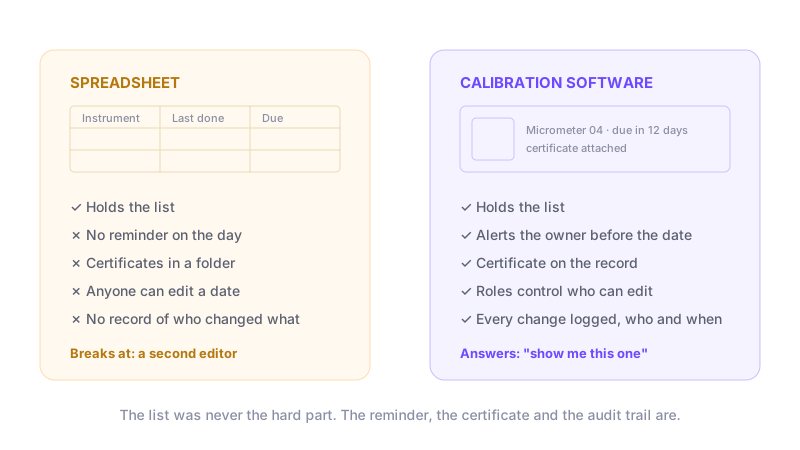
- Spreadsheets handle the list well; they fail at reminders, linked certificates and the audit trail.
- A due date in a cell does nothing on the day — someone has to remember to open the file.
- Any cell can be edited with no record, so a spreadsheet cannot prove a date was not moved.
- Three triggers to move: a second editor, a missed due date that reached production, or a scheduled audit.
- Migration is usually a CSV export and import, not re-typing the register.
Where does Excel still work fine?
In short: a small register, one person maintaining it, and nothing safety-critical riding on the readings.
Worth being fair about this, because most articles on this topic are not. For a shop with around 20 instruments and one person responsible, Excel is genuinely adequate. It costs nothing, needs no approval to adopt, and every quality manager can already use one.
Excel is the right answer when all of the following are true. If you are in this group, moving to software buys you very little, and you should stay put.
- Roughly 20 to 30 instruments, and the list is not growing fast
- One person owns the register — nobody else edits it
- No regulated audit against ISO/IEC 17025, 21 CFR Part 11 or IATF 16949
- Certificates arrive rarely enough that a folder still works
- Nothing safety-critical is accepted on these measurements
Why do calibrations slip past their due date?
In short: because a spreadsheet cannot start a conversation — someone has to remember to open it.
A due date in a cell does nothing on the day it arrives. It relies on a person opening the file, sorting the column and acting. Miss a week because of leave or a busy month, and instruments go out of calibration while still in use on the line.
This is the failure that costs the most, because it is retrospective. Once a gauge is found out of tolerance, everything it measured since its last good calibration is in question — and the spreadsheet cannot tell you what that was. If you are not sure what that record is supposed to contain, what calibration management covers sets out the four parts.
Where do the certificates end up?
In short: in a shared folder, named inconsistently, with no link to the instrument they belong to.
The certificate is the evidence. A spreadsheet row can hold a filename, but nothing enforces that the file exists, that it is the current one, or that it was not overwritten. In most teams the certificates live in a folder tree that only one person fully understands.
An auditor rarely asks for the register. They pick one instrument and ask to see its history and its certificates. That is the request a folder-plus-spreadsheet setup handles worst.
Which certificate satisfies them depends on your market — a NABL scope in India, UKAS in the UK, an A2LA or ANAB accreditation in the United States. The country guides name the body and what its assessors expect to see attached to each instrument.
Can a spreadsheet prove nothing was changed?
In short: no — any cell can be edited by anyone, with no record that it happened.
This is the gap that matters most for a regulated audit. A due date can be moved forward, a failed result can be overwritten, and the file gives no indication either happened. Version history in a cloud spreadsheet helps a little, but it is not an audit trail tied to the instrument record.
Calibration software logs every change against the record it belongs to — who, what, when. That is what turns "we did not move that date" from a claim into something you can show.
When should you switch from Excel to calibration software?
In short: when two or more of the five triggers below are already true — not when the list simply gets long.
Size alone is a poor trigger. A 300-instrument register maintained by one careful person can run in Excel; a 40-instrument register touched by four people cannot. Count the triggers, not the rows. Two or more, and the spreadsheet is already costing you more than software would.
| Trigger | Why it matters | Already true? |
|---|---|---|
| A second person edits the register | Conflicting copies start immediately, and no change is attributable | — |
| A due date was missed and reached production | Everything that instrument measured is now in question | — |
| An audit is scheduled | This is when certificate-hunting cost becomes visible, at the worst moment | — |
| You work to ISO/IEC 17025 or 21 CFR Part 11 | Both expect an audit trail a spreadsheet cannot produce | — |
| More than one site or shift needs the same list | A shared file across sites is a version problem, not a sharing solution | — |
How to move without losing your history
Export the sheet to CSV with one row per instrument and clear headers, then import it. You keep the register you already have instead of re-typing it. Most tools, including our own free calibration management software, accept an Excel or CSV upload on the free plan.
Do the export even if you are undecided. A clean CSV makes every trial faster, and it is useful on its own — a tidy register is worth having whichever tool you end up using. If you track gages specifically, the same import works for gage calibration tracking.
What it costs to compare properly
Prices in this market run from free to several hundred dollars a month, and most vendors charge by how many instruments you track rather than by user. We keep a sourced, dated breakdown of what each vendor actually charges on our calibration software pricing comparison, and a tool-by-tool view on the comparison hub.
Track calibration without the spreadsheet
CalibraCore keeps the register, the due dates and every certificate in one place, with a full audit trail. See free calibration management software.
Common questions
Is there a free calibration Excel template?
Plenty exist, and they are a reasonable starting point for a very small register. They inherit every limitation above: no reminders, no linked certificates, no audit trail. Treat a template as a way to get your instrument list into one place, then import that list somewhere it can be tracked properly.
Will an auditor reject a spreadsheet?
Not automatically. Auditors assess whether your control of measuring equipment is effective, not which tool you used. A complete, current spreadsheet with certificates that can be produced on request can pass. The risk is that spreadsheets tend not to stay complete and current.
How do I move my calibration data out of Excel?
Save the sheet as CSV with one row per instrument and clear column headers — name or ID, serial number, location, last calibration date, interval, next due date. Most calibration tools import that directly, so you keep your existing register instead of re-typing it.
What columns should a calibration spreadsheet have?
At minimum: instrument name, an ID or serial number, where it is kept, who owns it, the last calibration date, the interval, and the next due date. Add a column for the certificate file name. Anything less and you cannot answer an auditor's first question.
Can Excel or Google Sheets send calibration reminders?
Not on its own. You can add a script or a reminder in your calendar, but it is a separate thing you have to build and maintain. If the person who built it leaves, the reminders usually stop and nobody notices until something is overdue.
How many instruments can a spreadsheet handle?
The file will hold thousands. The process breaks long before that — usually around the point where a second person starts editing, or where you have more certificates than you can name consistently. Most teams feel the strain between 50 and 150 instruments.
Can two people edit the same calibration spreadsheet?
In a cloud sheet, yes, but you lose track of who changed what. In a file on a shared drive, you get conflicting copies. Either way there is no record tying a change to a person, which is the part an audit cares about.
What is an audit trail?
It is an automatic record of every change: what was changed, who changed it, and when. It cannot be edited afterwards. It is how you show that a due date was not quietly moved or a failed result overwritten. Spreadsheets do not have one.
Where should calibration certificates be stored?
Attached to the instrument record, not in a separate folder. If they live in a folder tree, finding one means knowing how the person who filed it named things. Attaching the file to the instrument means anyone can find it in seconds.
Is calibration software expensive?
It ranges from free to several hundred dollars a month. Some tools, including ours, have a plan that stays free with no time limit. Compare on your instrument count, not on the headline price, because most tools charge by how many items you track.
How long does it take to move off a spreadsheet?
Usually an afternoon for the data. Export to CSV, tidy the column headers, import. The longer part is agreeing intervals and owners, which is work you needed to do anyway. Most teams are running properly within a week.